Existing Identity
MCP uses Report Server authentication and the identity associated with the authenticated user.
Report Server Professional
Connect AI to your reporting data without giving AI direct access to your database.
AcuGIS Report Server Professional provides a governed MCP interface to the datasets behind reports. AI clients can discover and query data the authenticated user is already permitted to access while Report Server remains the security boundary.
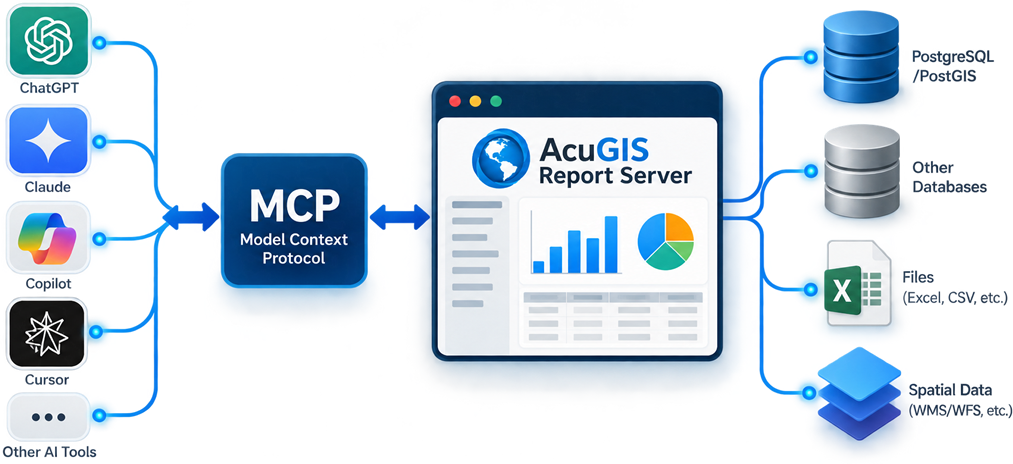
MCP extends existing Report Server capabilities to compatible AI clients. Instead of connecting an AI client directly to a database, Report Server controls which datasets the user can discover and query.
MCP uses Report Server authentication and the identity associated with the authenticated user.
Users can access only report datasets they are already authorized to view.
AI clients work through declared report datasets and parameters rather than receiving unrestricted SQL access.
The AI client talks to Report Server, not directly to the underlying database. Report Server authenticates the request, applies existing access controls, and exposes a controlled dataset interface.
AcuGIS Report Server provides six MCP tools for discovering, understanding, and querying authorized reporting datasets and data sources.
Discover the report datasets the authenticated user is permitted to view.
Explore dataset fields, parameters, and metadata without exposing the underlying SQL.
Execute authorized report datasets using their defined parameters and retrieve structured results.
Discover data sources the authenticated user may explore through reports they are permitted to view.
Explore data source metadata and available structure, including schemas, tables, columns, and declared relationships.
Run one read-only SQL statement against a data source the authenticated user may access through a permitted report. Write, DDL, and multi-statement queries are rejected, and results are limited.
Watch AI query reporting data securely through AcuGIS Report Server
Report Server does not add an LLM to your reporting infrastructure. MCP is a controlled interface that allows compatible AI clients to use capabilities Report Server already provides.
MCP uses the same Report Server identity and authorization model as the rest of the platform. Personal Access Tokens authenticate API access, and report permissions determine which datasets a user can access.
MCP Server is a Professional capability for organizations that want to connect AI clients to governed reporting data while keeping Report Server in control of authentication, authorization, and data access.
Give compatible AI clients controlled access to the reporting data your users are already authorized to use.
